Want to buy shares of a company before they go public in Nepal? An IPO (Initial Public Offering) lets you do exactly that. When companies in Nepal decide to sell their shares to the public for the first time, they announce an IPO through NEPSE.
Applying for IPO in Nepal has become much easier since everything moved online. You no longer need to visit banks or fill out paper forms. Everything happens digitally through your computer or phone.
Here’s why IPOs matter for beginners:
- You get shares at the base price of Rs. 100 per unit
- Companies often grow after going public
- It’s your chance to own part of Nepal’s growing businesses
- The process is completely digital and secure
This guide will walk you through every step to invest in the share market. From opening the right accounts to checking your results, you’ll learn how to apply for any IPO like Hydro, Banks, Lagubitta, etc in Nepal.
What You Need Before Applying for IPO in Nepal
Before you can invest in any IPO, you need to set up a few accounts and documents. Think of these as your toolkit for investing in Nepal’s stock market.
Essential Requirements:
- Nepali Citizenship: You must be a Nepali citizen to apply for IPOs in Nepal. Your citizenship certificate will be needed when opening accounts.
- Bank Account with ASBA: You need a bank account that supports ASBA (Application Supported by Blocked Amount). Most major banks in Nepal offer this service. The bank will block your money during the application period.
- Demat Account: A demat account in Nepal stores your shares digitally. It’s like a digital wallet for your stocks. You can open this at any licensed bank or financial institution that acts as a Depositary Participant.
- CRN Number: Your CRN number connects your bank account to MeroShare. This special code is essential for online IPO applications. You get this from your bank after filling out a separate form.
- MeroShare Account: MeroShare is Nepal’s official platform for IPO applications. It’s run by CDSC (Central Depository System and Clearing Ltd). You’ll use this website or app to apply for every IPO.
- Minimum Investment Most IPOs require a minimum investment of Rs. 1,000 (10 share value units × Rs. 100 each). Make sure your bank account has enough money plus an extra 10 to 20 rupees for any bank charges.
- Pro Tip: It’s easier when all your accounts are from the same bank. This makes the CRN number process smoother and reduces confusion during applications.
Step-by-Step Guide: How to Apply IPO from Mero Share online
Ready to apply for your first IPO? Here’s exactly how to do it through MeroShare, Nepal’s official IPO platform.
Step 1: Create Your MeroShare Account
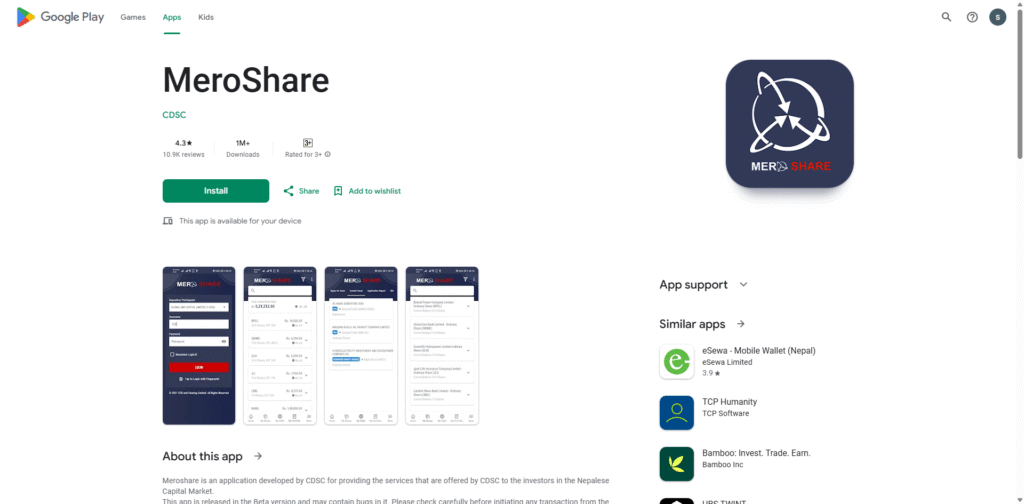
Visit the MeroShare website or download their mobile app. You’ll need your Demat account details to register. Choose your DP (Depository Participant) from the dropdown menu – this should be the same institution where you opened your Demat account.
Step 2: Login to MeroShare
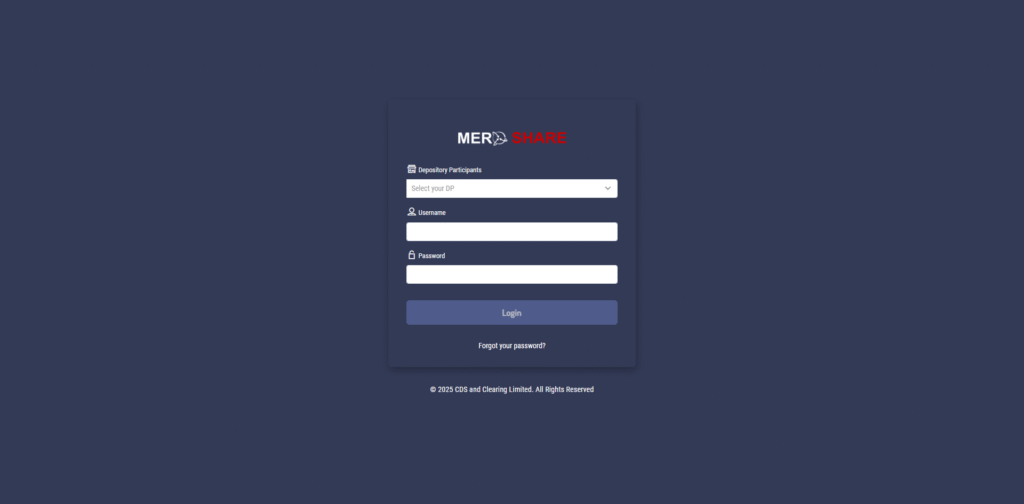
Enter your username and password in the Meroshare dashboard. Make sure to select the correct DP from the dropdown menu before logging in. Many people make mistakes here, so double-check this step.
Step 3: Navigate to Apply for Issues
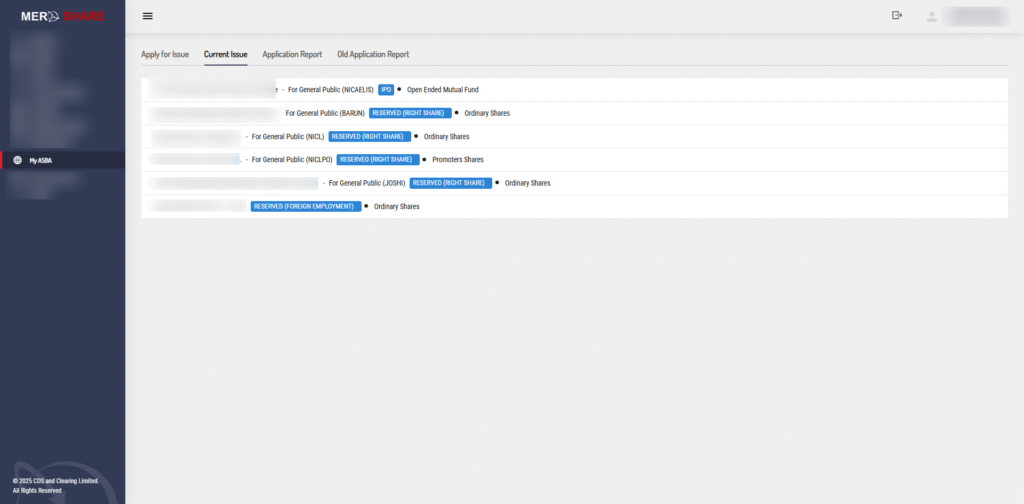
Once logged in, look for “My ASBA” in the left menu. Click on it, then select “Current Issue.” This shows all IPOs currently accepting applications.
Step 4: Select Your IPO
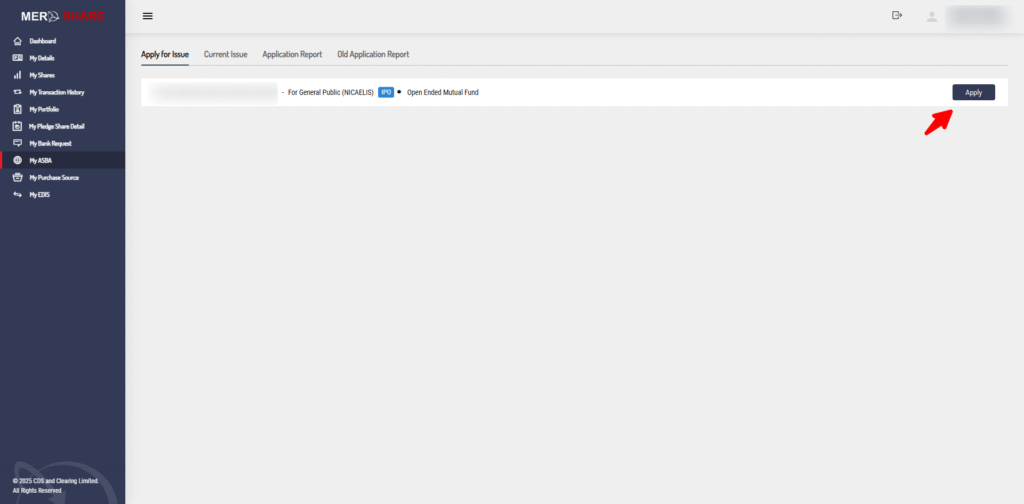
You’ll see a list of companies with their IPO details. Find the company you want to invest in and click “Apply” next to it.
Step 5: Fill the C-ASBA Registration Form
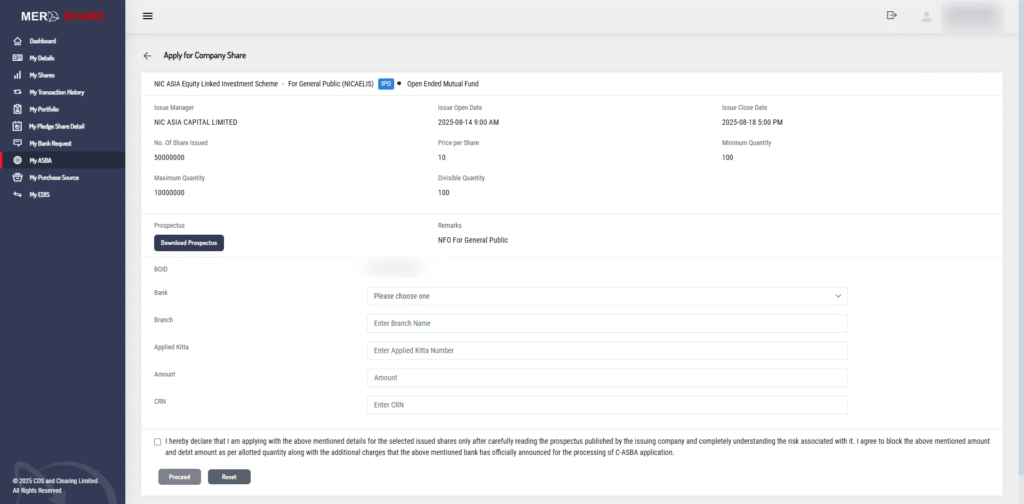
This is where you enter your application details:
- Applied Quantity: Enter how many shares you want (minimum is usually 50)
- Bank Account: Select your bank account from the dropdown
- CRN Number: Enter your CRN number carefully (no spaces or dashes)
Step 6: Review and Submit
Double-check all your information. Pay special attention to:
- CRN number accuracy
- Applied quantity meets minimum requirements
- Correct bank account selection
Click “Apply” when everything looks correct.
Step 7: Verify Your Application
Enter the verification code shown on screen. Click “Confirm” to submit your application.
Success! You’ve successfully applied for the IPO. MeroShare will show a confirmation message. Your bank account will now have the applied amount blocked until results are announced.
Important Notes:
- Applications are usually open for 4 working days only
- Apply early to avoid last-minute rush
- Keep your CRN number handy for future applications
Alternative Ways to Apply IPO Through Online in Nepal
While MeroShare is the most popular method, you have other options to apply ipo through online in Nepal.
Mobile Banking Apps
Most major banks now allow IPO applications through their mobile apps:
- Video Source: Mera Tips And Tricks
- NIC Asia Mobile Banking: Look for “IPO Apply” in investment menu
- Video source: BACK AGAIN
- Global IME Mobile Banking: Find IPO section under investment.
Internet Banking
You can also use your bank’s internet banking portal. The process is similar to mobile apps but done through your computer browser.
Benefits of Alternative Methods:
- No need to remember MeroShare login details
- Directly connected to your bank account
- Often faster during peak application times
Drawbacks:
- Limited to your specific bank’s IPO partnerships
- May not show all available IPOs
- Interface varies between banks
How to Check Your IPO Application Status and Results
Curious about your IPO results? Here are multiple ways to check your application status and final allotment.
Method 1: Through MeroShare
This is the most reliable way:
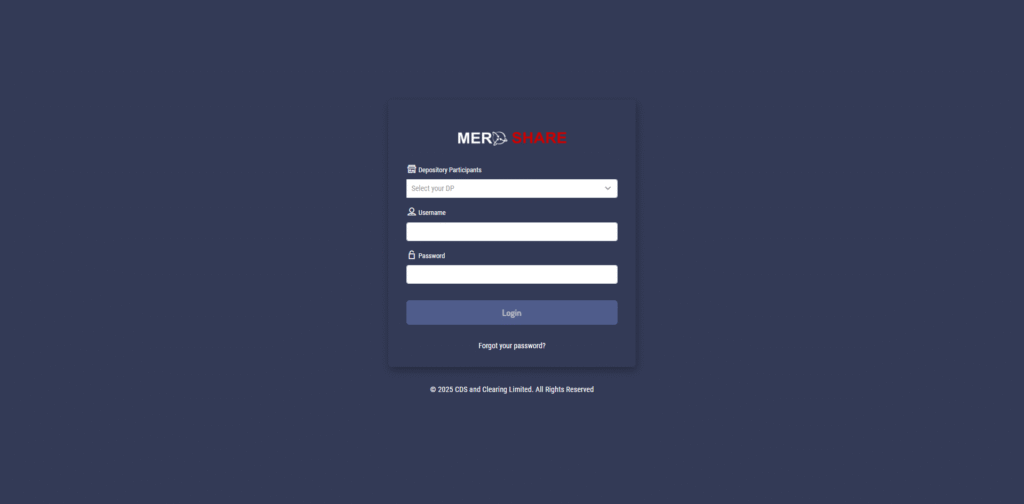
1. Login to your MeroShare account
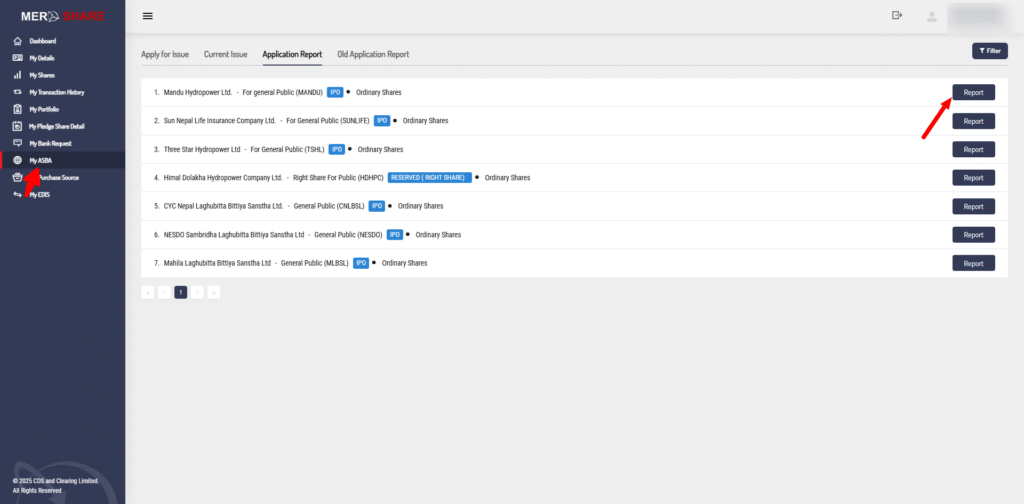
2. Go to “My ASBA” → “Application Report”
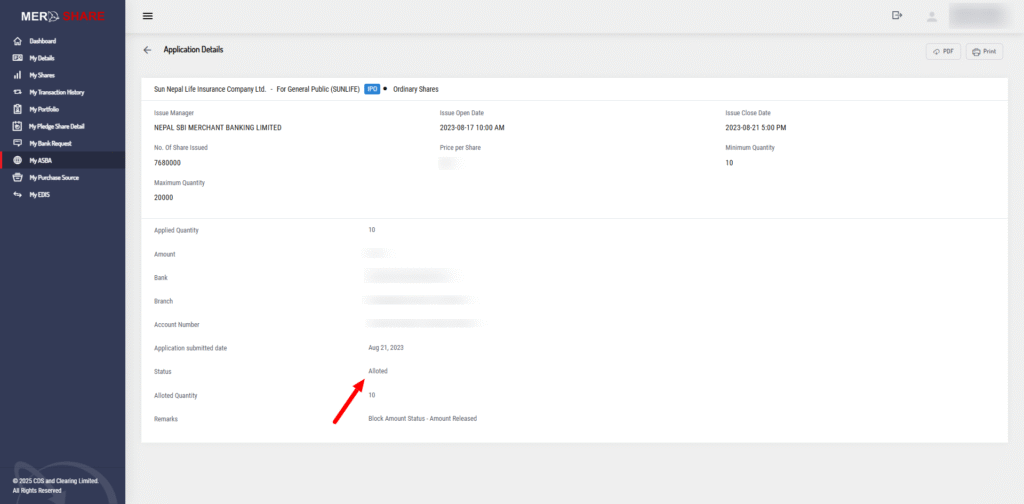
3. Find your company and click “Check Application status. “If it shows “Allotted,” you have received the IPO shares. If it shows “Not Allotted,” it means you were not selected.
Method 2: News Websites
Popular financial websites show IPO results:
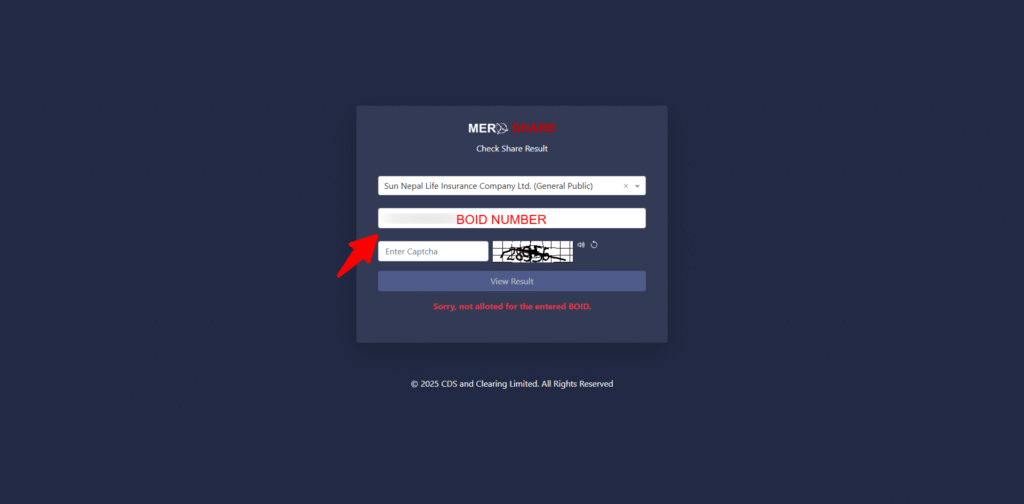
1. Visit the Allotment Result site
2. From the list/dropdown, select the company/IPO you want to check.
3. Enter your 16-digit BOID (Demat) number exactly as it appears—no spaces or dashes.
4. Click “Search” / “View Result.”
5. Check the status:
6. Allotted → You have received the shares.
7. Not Allotted → You did not receive any shares.
8. (Optional) Save a screenshot of the result for your records.
Method 3: SMS Alerts
Some banks send SMS notifications when:
- Your application is received
- Results are announced
- Money is deducted or released
Understanding Your Results:
- “Allotted”: You got shares (shows exact quantity)
- “Not Allotted”: You didn’t get any shares
- “Partial Allotment”: You got fewer shares than applied for
What to Do After Getting Results:
If Allotted:
- Check your Demat account in 3-5 days
- Your shares will appear there
- You can now trade them once they’re listed
If Not Allotted:
- Your money will be released within 2-3 days
- You can apply for the next available IPO
- Don’t worry – it’s normal and happens to everyone
Common Problems and Solutions
Even experienced investors face issues when applying for IPOs. Here are the most common problems and their solutions.
Login Issues
Problem: Cannot login to MeroShare Solutions:
- Check if you’re selecting the correct DP from dropdown
- Verify username and password (case-sensitive)
- Clear browser cache or try different browser
- Contact your DP for password reset
CRN Number Problems
Problem: CRN number not working or showing error Solutions:
- Double-check CRN number (no spaces or special characters)
- Ensure CRN is from the same bank you’re selecting
- Contact your bank to verify CRN status
- Some banks require CRN reactivation after long periods
Application Submission Failures
Problem: Application doesn’t submit or shows an error Solutions:
- Check minimum share quantity requirements
- Verify sufficient bank balance (including extra for charges)
- Try applying during off-peak hours (early morning)
- Use mobile app instead of website or vice versa
Bank Account Issues
Problem: Bank account not showing in MeroShare Solutions:
- Contact your bank to link account with MeroShare
- Ensure ASBA facility is activated
- Check if CRN number is properly registered
- Wait 24 hours after CRN registration before applying
Frequently Asked Questions
What is the minimum amount to invest in IPO in Nepal?
The minimum amount is NPR 1,000, with an additional charge of NPR 10–20 depending on the bank. Some banks don’t charge anything, while others charge between NPR 10 and 20, so you should keep at least NPR 1,010.
How long does it take to get IPO allotment results?
You can check the IPO allotment status online within a week after the issue closes
Can I apply for multiple IPOs at the same time?
Yes, you can apply multiple IPOs at the same time there are no limitations.